Applying Deep Models
You can apply deep models trained for semantic segmentation and regression tasks to selected datasets with the options in the Apply box, shown below. You should note that the Apply options are available on the Model Training and Model Overview panels of the Deep Learning tool. You can apply models to the full dataset
Apply options

- Select the required trained model on the Model Overview panel, if required.
- Generate a preview to verify the loaded model, recommended (see Previewing Model Inference).
- Select the required input(s) in the Input drop-down menu.
- If your model has an input dimension of 2.5D or 3D, select a reference slice and spacing. These options are circled below.

- If required, you can normalize the data range prior to applying the model (see Normalizing Data Ranges Prior to Training or Inference).
- Click the Apply button and then choose an option in the drop-down menu, as described below.
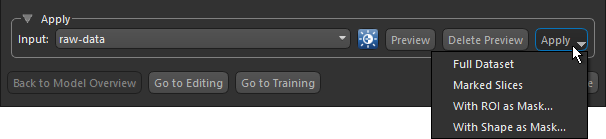
Full Dataset… The full dataset will be segmented. In this case, processing will start automatically.
Marked Slices… Only marked slices will be segmented (see Marking Image Slices). In this case, processing will start automatically.
With ROI as Mask… Only data within the region of interest selected as the mask will be processed (see Creating Mask ROIs). You can choose the required mask in the Choose an ROI as Mask dialog and then click OK to start processing.
When processing is complete, a new multi-ROI or processed dataset is added to the Data Properties and Settings panel.
